
Appearance
To directly send OpenTelemetry metrics and traces generated by ARMS from your AI Application to Grafana Cloud, follow the below steps.
1. Get your Credentials
Sign in to Grafana Cloud Portal and select your Grafana Cloud Stack.
Click Configure in the OpenTelemetry section.
In the Password / API Token section, click on Generate now to create a new API token:
- Give the API token a name, for example
arms - Click on Create token
- Click on Close without copying the token
- Copy and Save the value for
OTEL_EXPORTER_OTLP_ENDPOINTandOTEL_EXPORTER_OTLP_HEADERS
INFO
Replace the space after
Basicwith%20: OTEL_EXPORTER_OTLP_HEADERS="Authorization=Basic%20[base64 instanceID:token]"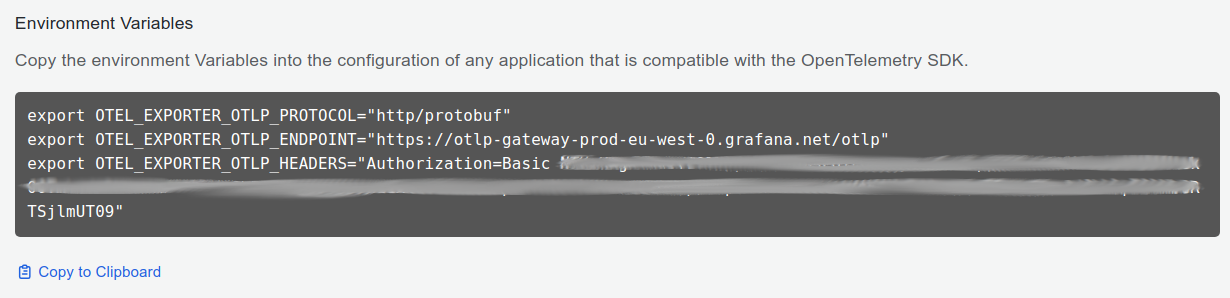
- Give the API token a name, for example
2. Instrument your application
SDK
For direct integration into your Python applications:
Function Arguments
python
import elsai_arms

elsai_arms.init(
  otlp_endpoint="YOUR_GRAFANA_OTEL_GATEWAY_URL",
  otlp_headers="YOUR_GRAFANA_OTEL_GATEWAY_AUTH"
)
Replace:
YOUR_GRAFANA_OTEL_GATEWAY_URLwith theOTEL_EXPORTER_OTLP_ENDPOINTvalue you copied in Step 1.- Example:
https://otlp-gateway-<zone>.grafana.net/otlp
- Example:
YOUR_GRAFANA_OTEL_GATEWAY_AUTHwith theOTEL_EXPORTER_OTLP_HEADERSvalue you copied in Step 1.- Example:
Authorization=Basic%20<base64 encoded Instance ID and API Token>
- Example:
Environment Variables
python
import elsai_arms

elsai_arms.init()
Set these environment variables:
shell
export OTEL_EXPORTER_OTLP_ENDPOINT="YOUR_GRAFANA_OTEL_GATEWAY_URL"
export OTEL_EXPORTER_OTLP_HEADERS="YOUR_GRAFANA_OTEL_GATEWAY_AUTH"
Replace:
YOUR_GRAFANA_OTEL_GATEWAY_URLwith theOTEL_EXPORTER_OTLP_ENDPOINTvalue you copied in Step 1.- Example:
https://otlp-gateway-<zone>.grafana.net/otlp
- Example:
YOUR_GRAFANA_OTEL_GATEWAY_AUTHwith theOTEL_EXPORTER_OTLP_HEADERSvalue you copied in Step 1.- Example:
Authorization=Basic%20<base64 encoded Instance ID and API Token>
- Example:
See the ARMS SDK configuration docs for more advanced options.
CLI
For zero-code auto-instrumentation via command line:
CLI Arguments
shell
# Using CLI arguments
elsai-arms-instrument \
  --otlp-endpoint "YOUR_GRAFANA_OTEL_GATEWAY_URL" \
  --otlp-headers "YOUR_GRAFANA_OTEL_GATEWAY_AUTH" \
  --service-name "my-ai-service" \
  --deployment-environment "production" \
  python app.py
Replace:
YOUR_GRAFANA_OTEL_GATEWAY_URLwith theOTEL_EXPORTER_OTLP_ENDPOINTvalue you copied in Step 1.- Example:
https://otlp-gateway-<zone>.grafana.net/otlp
- Example:
YOUR_GRAFANA_OTEL_GATEWAY_AUTHwith theOTEL_EXPORTER_OTLP_HEADERSvalue you copied in Step 1.- Example:
Authorization=Basic%20<base64 encoded Instance ID and API Token>
- Example:
Environment Variables
shell
# Set environment variables (takes precedence over CLI args)
export OTEL_EXPORTER_OTLP_ENDPOINT="YOUR_GRAFANA_OTEL_GATEWAY_URL"
export OTEL_EXPORTER_OTLP_HEADERS="YOUR_GRAFANA_OTEL_GATEWAY_AUTH"
export OTEL_SERVICE_NAME="my-ai-service"
export OTEL_DEPLOYMENT_ENVIRONMENT="production"

# Run your application
elsai-arms-instrument python app.py
Replace:
YOUR_GRAFANA_OTEL_GATEWAY_URLwith theOTEL_EXPORTER_OTLP_ENDPOINTvalue you copied in Step 1.- Example:
https://otlp-gateway-<zone>.grafana.net/otlp
- Example:
YOUR_GRAFANA_OTEL_GATEWAY_AUTHwith theOTEL_EXPORTER_OTLP_HEADERSvalue you copied in Step 1.- Example:
Authorization=Basic%20<base64 encoded Instance ID and API Token>
- Example:
See the ARMS SDK configuration docs for more advanced options.
3. Import the pre-built Dashboard
- Log into your Grafana Cloud Instance.
- Click Dashboards in the primary menu.
- Click New and select Import in the drop-down menu.
- Copy the dashboard JSONs provided in the offical Grafana AI Observability repository
- Paste the dashboard JSONs one by one directly into the text area.
- Click Import.
- Save the dashboard.