
Appearance
Tools
A tool is one thing an agent can do beyond thinking and writing: call a web service, use an MCP server, run a Python function, search the web, read the time. This page explains the three kinds of tool you can register, the built-in common tools, and how to look after them.
At a glance
| Where | Sidebar → Build → Tools (tab Your tools). Apps have their own tab, see Apps |
| Who | Viewer: browse. Author: register and save drafts. Approver/Admin: publish, withdraw, mark as common |
| Before you begin | If the service needs a key, an Admin puts it in the Vault first. For MCP, the server's domain must be allowed (Settings → MCP servers) |
1. What it is and why it matters
An agent can reason, but on its own it cannot look anything up or change anything. A tool gives it one ability. The agent reads each tool's description and decides, while it works, whether to call it.
The golden rule about keys: a credential never goes into a tool. The tool holds only a pointer to a vault secret (secret://project/payer_api_key). The real value is fetched when the call happens, so a tool's definition can be shared, exported or reviewed without leaking anything.
2. Key ideas
| Idea | Meaning |
|---|---|
| Three kinds | HTTP service (you already run it), MCP server (a remote server that lists its own tools), Python function (a few lines, no service to deploy) |
| Description | Written for the AI, not for people. It decides whether the tool is ever called |
| Draft / Published | Agents can use only published tools. Editing a published tool makes a new version; agents keep the published one until the new one is published |
| Common | Offered to every agent in the project, whatever its folder. Studio comes with eight |
| Folder | A tool in a folder is offered first to agents in the same folder |
| Attach to agents | Tools are given to agents (Build → Tools section), never to workflow steps |
3. Browse your tools
Screenshot: Build → Tools
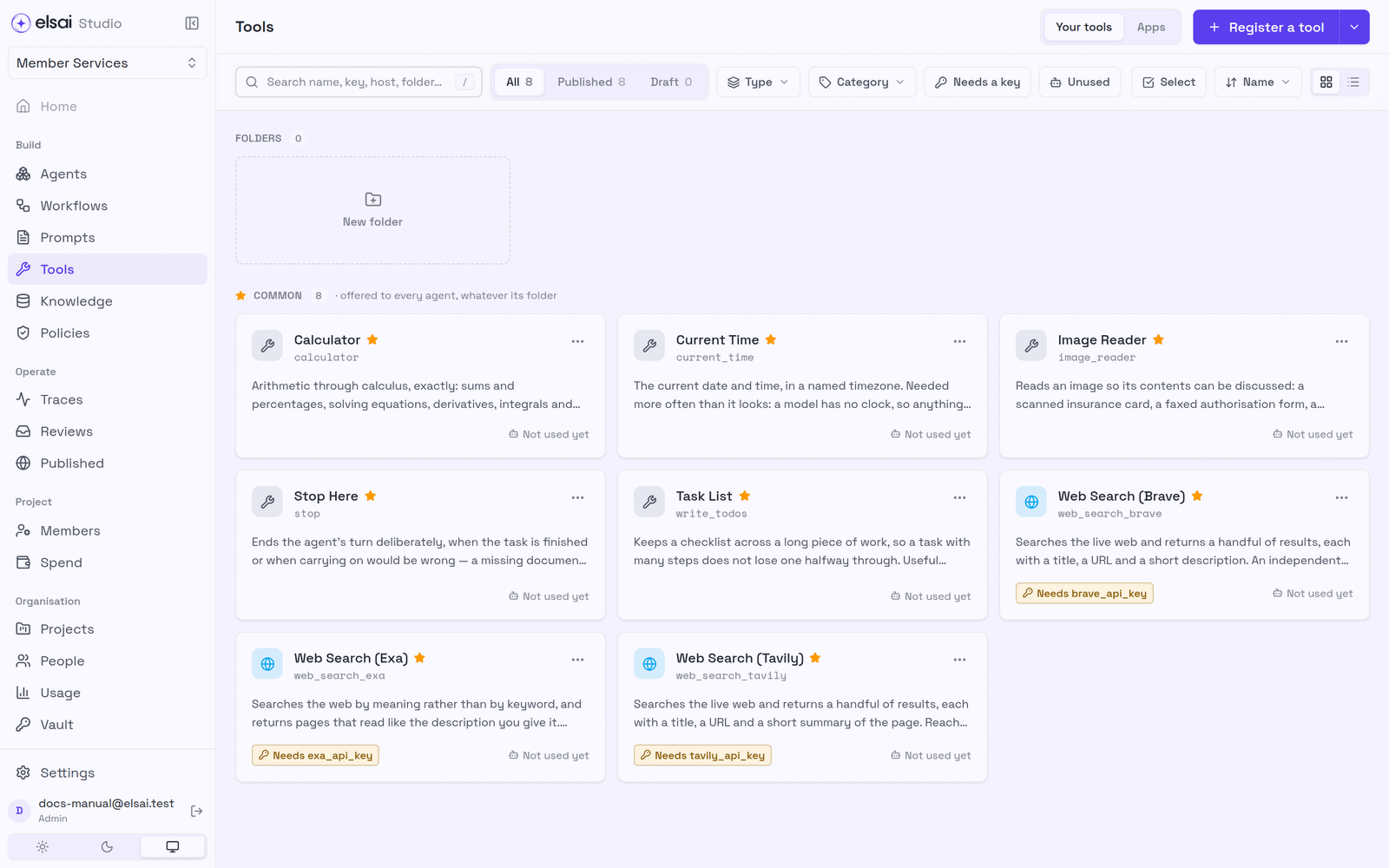
| Control | Does |
|---|---|
| Your tools · Apps | Your registered tools; the app catalogue |
| Register a tool (and ▾ for Folder) | Add a tool or a folder |
| Search (/) | By name, key or description |
| All · Published · Draft | Filter by status |
| Type · Category · Needs a key · Unused | Narrow the list. Unused = no agent uses it |
| FOLDERS / COMMON | Folders first, then the common tools |
| A tool card | Opens its detail drawer |
The built-in common tools
| Tool | Key | Use it for | Needs |
|---|---|---|---|
| Calculator | calculator | Exact arithmetic to calculus, totals, percentages, dosages | None |
| Current Time | current_time | Today's date and time in a timezone; a model has no clock | None |
| Image Reader | image_reader | Reading a picture: a scanned card, a faxed form | None |
| Stop Here | stop | Ending the agent's turn deliberately when carrying on would be wrong | None |
| Task List | write_todos | Keeping a checklist across long work | None |
| Web Search (Brave) | web_search_brave | Live web results from an independent index | brave_api_key in the Vault |
| Web Search (Exa) | web_search_exa | Searching by meaning ("a page like…") | exa_api_key |
| Web Search (Tavily) | web_search_tavily | Recent information, summarised results | tavily_api_key |
4. Register a tool
- In Tools, click Register a tool.
- Choose the kind.
Screenshot: Choose the kind of tool
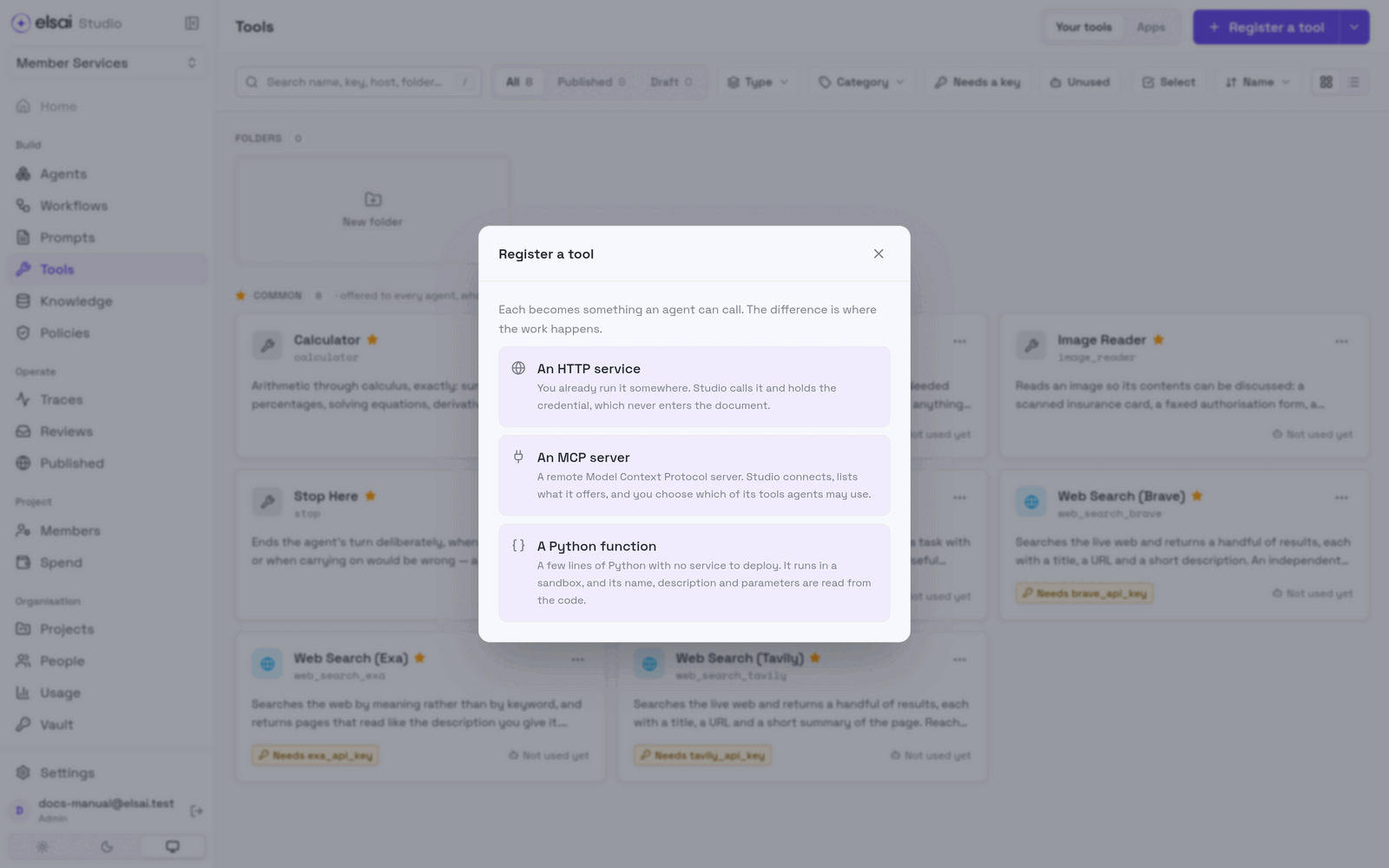
| You have… | Choose |
|---|---|
| A web service or API you already run or subscribe to | An HTTP service |
| A server that speaks the Model Context Protocol | An MCP server |
| A few lines of logic and nothing to deploy | A Python function |
| Gmail, Outlook, Teams or another popular app | Not here, use the Apps tab (Apps) |
5. Register an HTTP tool
5.1 Name, key, description, category
| Field | Enter | Example |
|---|---|---|
| Name | A human name | Payer Portal Lookup |
| Key | How agents refer to it. Fills itself from the name; lowercase letters, digits and underscores, starting with a letter | payer_portal_lookup |
| Description | The most important field. At least 20 characters. Say what it returns and when to reach for it | Looks up a member by ID in the payer portal. Returns coverage status, plan name and effective dates. Use when you need to confirm a patient is covered. |
| Category | Search & web, Knowledge, Reasoning & maths, Media & documents, Integrations, Other. For browsing only | Integrations |
A vague description gives you a tool that never fires, which looks exactly like a broken tool. "Payer lookup" is weak. "Looks up a member by ID… Use when you need to confirm a patient is covered" is strong.
5.2 Method and endpoint
| Field | Notes |
|---|---|
| Method | GET, POST, PUT, PATCH or DELETE |
| Endpoint | The full URL, starting http:// or https:// |
The agent's values travel in the JSON body for POST, PUT and PATCH, and in the query string (?member_id=…) for GET and DELETE.
5.3 Credential (optional)
Choose No credential, or a vault secret (listed as name (this project) or name (organisation)). Then say where the key goes. The presets cover nearly every service:
| Preset | In | Named | As | Sends |
|---|---|---|---|---|
| Bearer token | Header | Authorization | Bearer {} | Authorization: Bearer <key> |
| Header | Header | x-api-key | {} | x-api-key: <key> |
| Query parameter | Query | api_key | {} | …?api_key=<key> |
| Body field | Body | api_key | {} | {"api_key": "<key>"} |
{} stands for the key and must stay in As. Change Named if the service uses another name (e.g. X-Subscription-Token).
⚠️ The most common reason a good service answers
401is the key in the wrong place. Check this box first.
5.4 Parameters
The values the agent fills in each time it calls the tool. Click Add parameter for each.
| Column | Meaning |
|---|---|
| Name | Exactly what the service expects (e.g. member_id). Studio sends it as typed |
| Type | string, number or boolean |
| Description | What the value means. The agent reads this too |
| Required | On = the agent must supply it |
5.5 Try it, then save
- Click Try it. Studio makes a real call with sample values (blank text,
0,false) and shows the whole response. A trial saves nothing; editing any field clears the result. - Save:
| Button | Does |
|---|---|
| Save draft | Saves it; agents cannot use it yet |
| Save and publish | Saves and releases it (Approver/Admin) |
| Back | Back to the choice of kind; what you typed is kept |
| Cancel | Close and discard |
Screenshot: The HTTP tool form
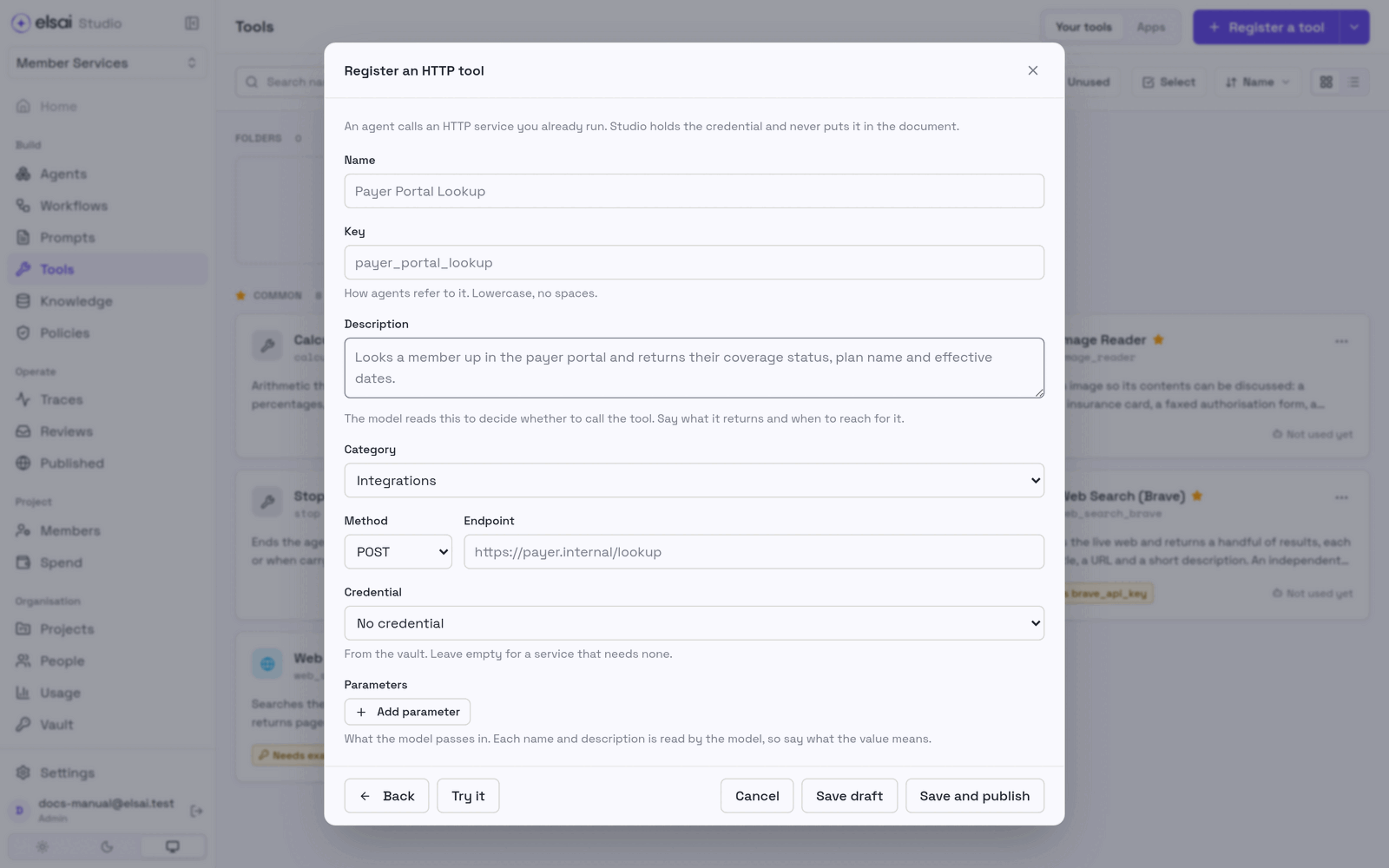
A service that insists on a real ID may answer the trial with 400 or 404. That is a data answer, not a connection problem, it proves the URL and key work.
6. Connect an MCP server
MCP (Model Context Protocol) is a standard way for a service to say "here are the tools I offer, and how to call each one." An HTTP tool is one dish you describe yourself; an MCP server hands you its whole menu and you tick the dishes your agents may order.
In Studio, one MCP server is one tool. Inside it are the individual tools you switched on.
| Supported | Not supported |
|---|---|
Remote servers over https:// | Servers that run as a program on your machine (stdio) |
| Streamable HTTP (use by default) and SSE (legacy) | Per-user OAuth sign-in |
| Sign-in: None, Bearer token, Custom header | Internal addresses, unless your platform team approved them |
Step 1: Connect
- Register a tool → An MCP server.
- Enter Name, optional Description, and the Server URL (usually ending
/mcp). - Choose Transport (keep Streamable HTTP unless the vendor says otherwise).
- Choose Authentication. For a token or header, pick the vault secret, or click New to create one here.
- Read the line under the URL, it tells you at once whether the server is allowed:
- ✅ Allowed by your organisation (…), go ahead.
- ⚠️ Not on your organisation's list of allowed MCP servers, an Admin must allow it.
- ❌ a reason (not https, private address…), fix the URL.
- Click Test connection.
Screenshot: Connect an MCP server
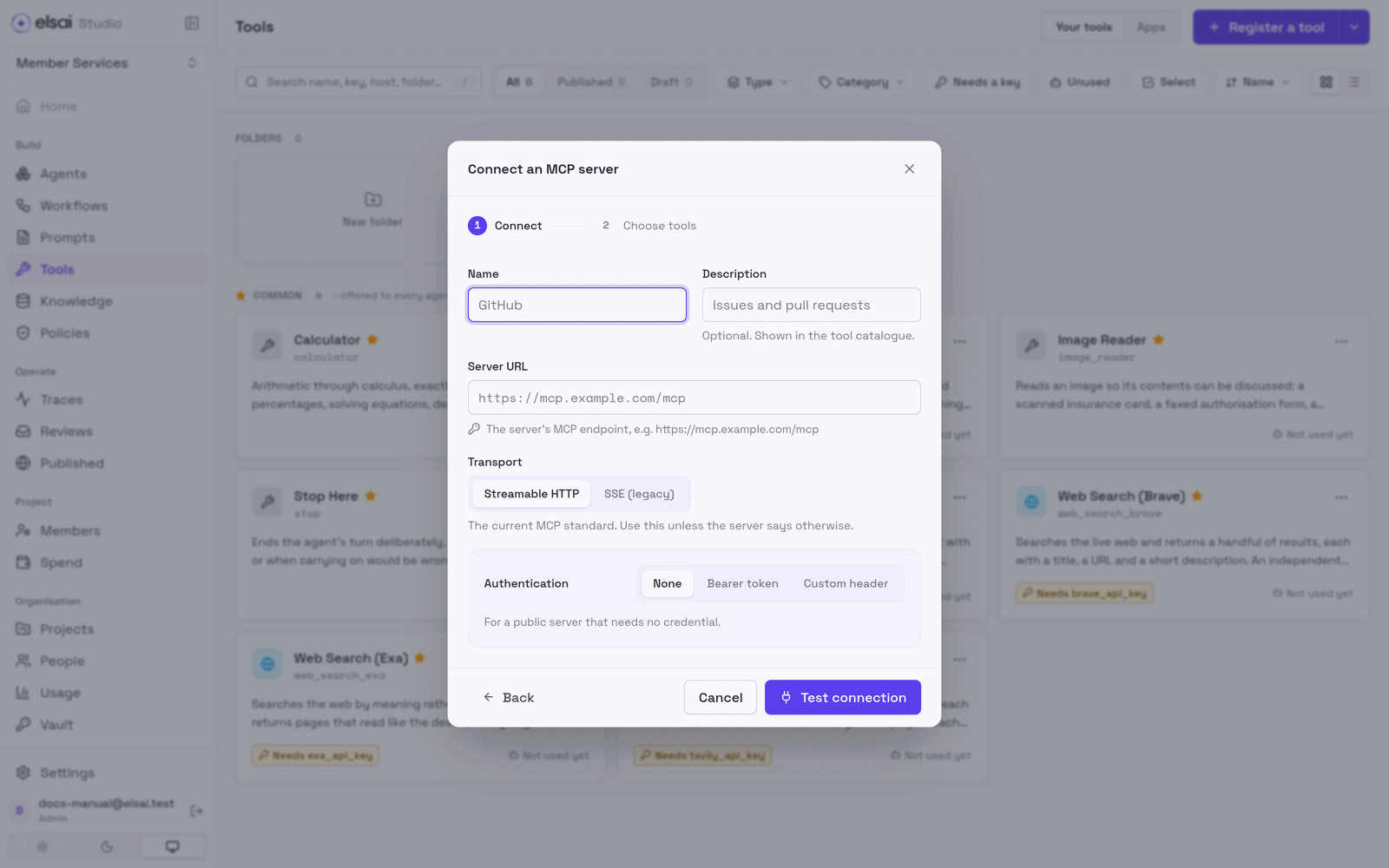
Step 2: Choose tools
On success you see Connected to host · N tools, then everything the server offers.
- Switch on only the tools agents should use. Start small: a tool that can delete or create will be used if an agent thinks it should. At least one must be on.
- Expand a row to see its description and parameters.
- Save draft or Save and publish.
Everything the server offered is saved, with the ones you left out switched off, so Studio can later tell "deliberately left out" from "brand new".
Keep up with a changing server
Studio freezes the tool list when you save, so a server changing cannot silently change what your agents do. Open the server from Tools and click Check for changes:
| Result | Meaning |
|---|---|
| Up to date | Nothing to do |
| The server offers new tools | New tools exist, off by default. Choose whether to add them |
| The server has changed | A tool was removed or changed. Rows are badged No longer offered or Changed on the server |
Click Review & update, choose again and publish. Until you do, agents keep the saved tools; a tool the server no longer offers answers agents with an error.
In traces, MCP tools appear as <server key>__<tool name>, e.g. github__search_issues. Very long results are cut short with a note, so one answer cannot flood the agent.
7. Register a Python function
A few lines of Python, with no service to deploy. Studio reads the tool's name, description and parameters from the code, and runs it in a sandbox.
python
from elsai import tool


@tool
def days_until(target_date: str) -> dict:
    """Count the days from today until a date.

    Args:
        target_date: The date to count to, as YYYY-MM-DD.
    """
    from datetime import date

    year, month, day = (int(part) for part in target_date.split("-"))
return {"days": (date(year, month, day) - date.today()).days}| Part | Becomes |
|---|---|
| The function name | The tool's key (days_until) |
| The docstring's first lines | The description the model reads |
Args: | Each parameter's description |
| Type hints | Each parameter's type; parameters without a default are required |
| Setting | Meaning |
|---|---|
| What the model sees | A live preview of the name, description and parameters, read from your code |
| Name · Category | What Studio shows |
| Timeout | Seconds it may run (default 30, up to 300) |
| Credentials | Vault secrets the code may read with os.environ. The sandbox passes these and nothing else, never Studio's own secrets |
Screenshot: A Python function tool
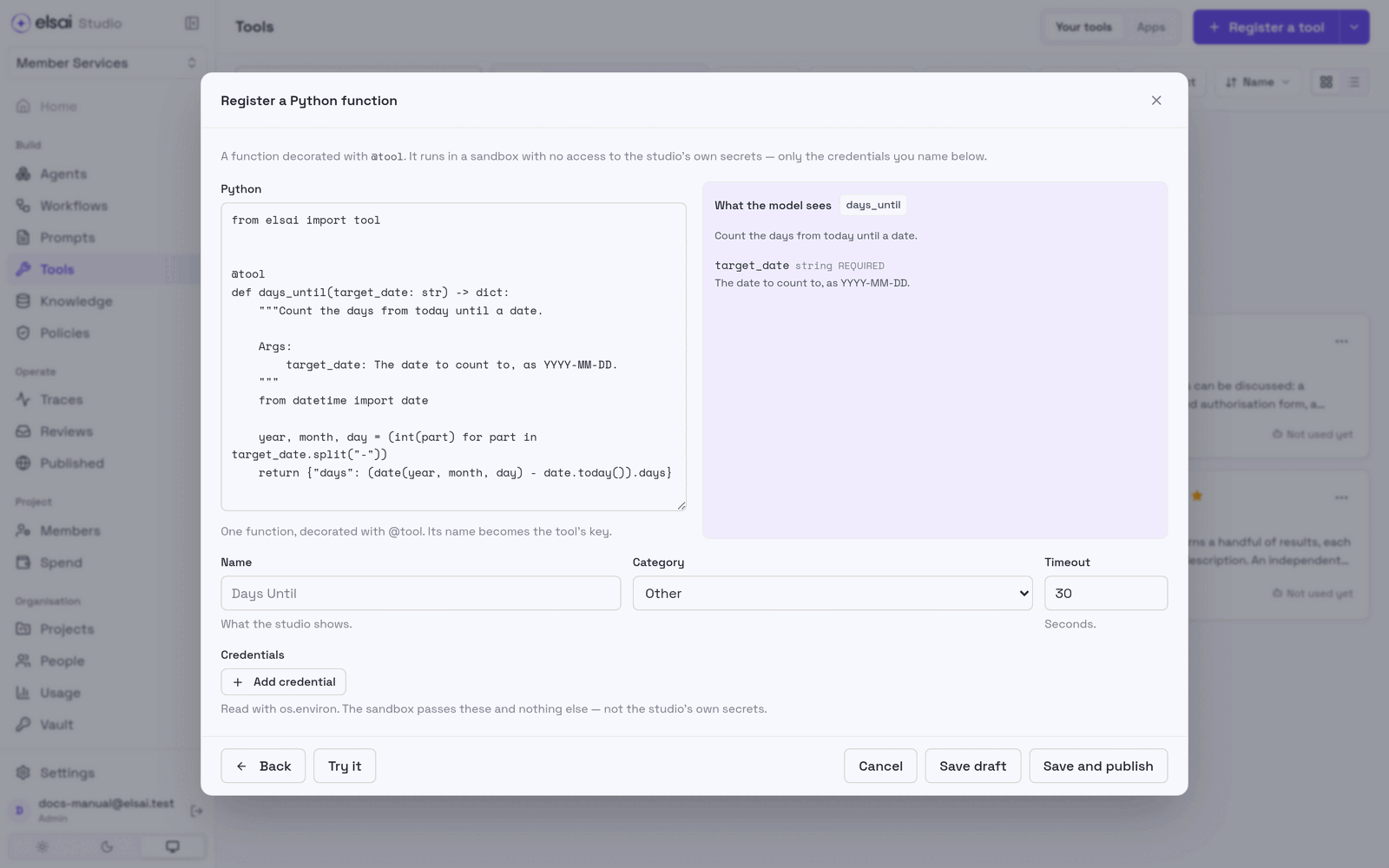
Try it runs the function once; Save draft / Save and publish as for HTTP tools.
8. Give a tool to an agent
- Open the agent → Tools.
- Tick the tool. Your folder's tools are listed first, then the common ones.
- Save the agent, test it in the Playground, and publish.
Then check the run: the Full trace (Playground) or the agent step's tool calls (workflow run) list each call, what was sent and what came back. If the tool was not called, improve its description and the agent's instructions.
9. Look after a tool
Click a tool to open its drawer.
| Section | Does |
|---|---|
| Edit | Change it. Saving makes a new version; agents keep the published one until you Publish vN |
| Where it runs | The endpoint, server or sandbox |
| Organise → Folder | Move it into a folder |
| Organise → Common | Offer to every agent (Approver/Admin) |
| Parameters | What the model passes in |
| Used by | The agents that use it |
| Delete draft | Remove a tool that was never published |
| Withdraw | Unpublish it (Approver/Admin). Agents that use it can no longer call it |
10. Troubleshooting
| Symptom | Likely cause | Fix |
|---|---|---|
| Describe what it returns… | Description under 20 characters | Write a fuller description |
| A key is lowercase letters… | Capitals, spaces or a leading digit | e.g. payer_lookup |
| Enter the full URL | Missing https:// | Add it |
| The format must contain "{}" | As lost its {} | Use Bearer {} or {} |
| Trial 401 / 403 | Key in the wrong place, or wrong key | Re-pick the preset; check Named; replace the secret |
| Trial 404 | Wrong path | Compare with the service's documentation |
| Trial 400 / 422 | The service dislikes blank sample values | Not a connection fault; test inside an agent |
| Trial times out | Service slow or unreachable from Studio | Check the service is up |
| No credential in the list | No secret exists | Ask an Admin to add it to the Vault |
| MCP: This server is not allowed | Not on the allowlist, or a safety rule | Ask an Admin to allow the domain |
| MCP: That does not look like an MCP endpoint | Wrong path or transport | Paths usually end /mcp (or /sse); try the other transport |
| MCP: The server refused the credential | Token expired, or sent the wrong way | Check Bearer vs header and the header name |
| MCP: The server's certificate could not be verified | Bad HTTPS certificate | The server's owner must fix it |
| An agent never uses the tool | Vague description; tool not attached or not published | Rewrite the description; attach; publish |
| No Save and publish | You are an Author | Save draft and ask an Approver |
| A run is refused at start for an MCP server | An Admin removed its domain from the allowlist | Ask an Admin |