
Appearance
Spend and budgets
See who is spending the project's model money and on what, and set limits so that no person, key or project can run away with the budget.
At a glance
| Where | Sidebar → Project → Spend. Organisation-wide: Organisation → Usage. Your own keys: Settings → My LLM keys |
| Who | Everyone sees Spend (members see their own; Admins see everyone). Only Admins set budgets and open Usage |
| Before you begin | At least one run, so there is something to show |
1. What it is and why it matters
Every agent in a project normally runs on one shared model key. Without limits, nobody knows who spent what, and one person running a workflow in a loop can use the month's money in a day.
| Question | Answer in Studio |
|---|---|
| How much can this project spend? | Project budget, one pool for everyone |
| How much can each person spend? | Member allowance, with per-person exceptions |
| How much can an outside caller spend? | API key budget |
| Who spent what, on which agent? | The Spend page |
The one rule: a run starts only if it is under every limit that applies, the project budget and the person's (or key's) own limit. Whichever runs out first stops it.
2. Key terms
| Term | Meaning |
|---|---|
| Period | Day, Week or Month. Resets at 00:00 UTC (05:30 IST), not local midnight |
| Limit by | Dollars, Tokens, or Both (whichever is reached first) |
| Block new runs / Warn only | Block stops runs at the limit. Warn never stops anyone; the meters turn red |
| Override | An exception for one person: Custom (another limit) or Unlimited (exempt from the allowance, the project budget still applies) |
| Own key | A member's personal model key. Tracked, never budgeted |
What counts
| Counted | Not counted |
|---|---|
| Playground runs, workflow runs, calls to published agents | Runs on a member's own key (tracked and shown, but never budgeted) |
| Every model call in the run, sub-agents included | A run resumed after a review (it was admitted when it started) |
| Only runs on the project's shared key |
| Run started from | Charged to | Counted against |
|---|---|---|
| Playground | The signed-in person | Their allowance + project budget |
| Workflow in Studio | The person who started it | Their allowance + project budget |
| Published agent, by API | The API key | That key's budget + project budget |
3. See where the money goes
Open Project → Spend and choose a period: Today · This week · This month · 90 days.
Screenshot: Spend, as an Admin
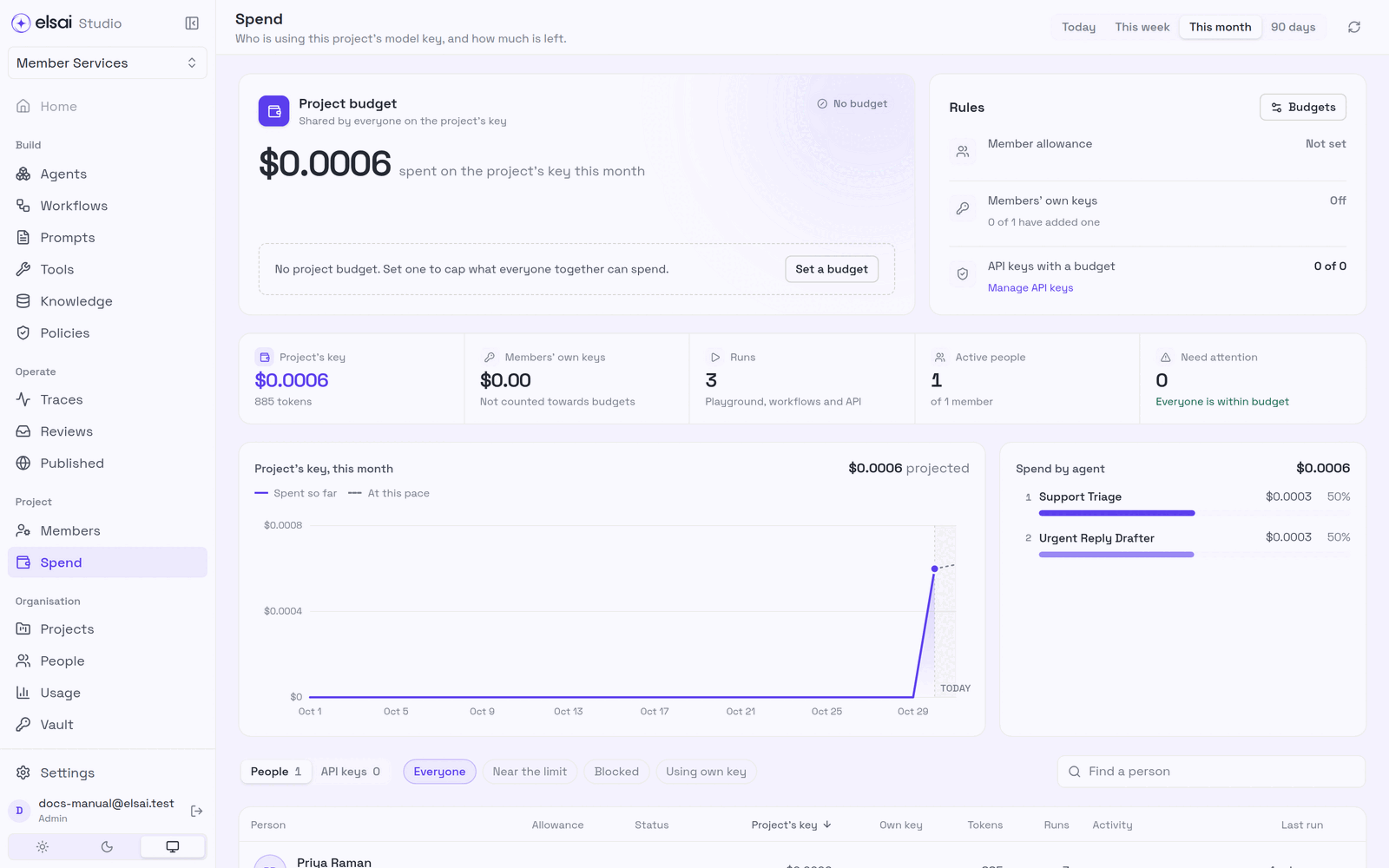
| As a member you see | As an Admin you also see |
|---|---|
| Your allowance: a meter, what is left, when it resets | A Project budget card: used of limit, status |
| The project budget as "$X left for everyone", no one else's numbers | Figures: Project's key, Members' own keys, Runs, Active people, Need attention |
| Your spend on the project's key and your own key, your runs, a daily chart | A projected month-end line, Spend by agent |
| Your spend by agent, Your recent runs | A Rules card, and People and API keys tabs |
The People tab (Admins): one row per person, runs, spend, tokens, allowance meter. Filter by Everyone · Near the limit · Blocked · Using own key, or find a person. Click a row for their allowance, spend by agent and recent runs (each opens its trace).
4. Set the budgets (Admin)
On Spend, click Set a budget (or Rules → Budgets). The Budgets drawer opens.
Screenshot: The Budgets drawer
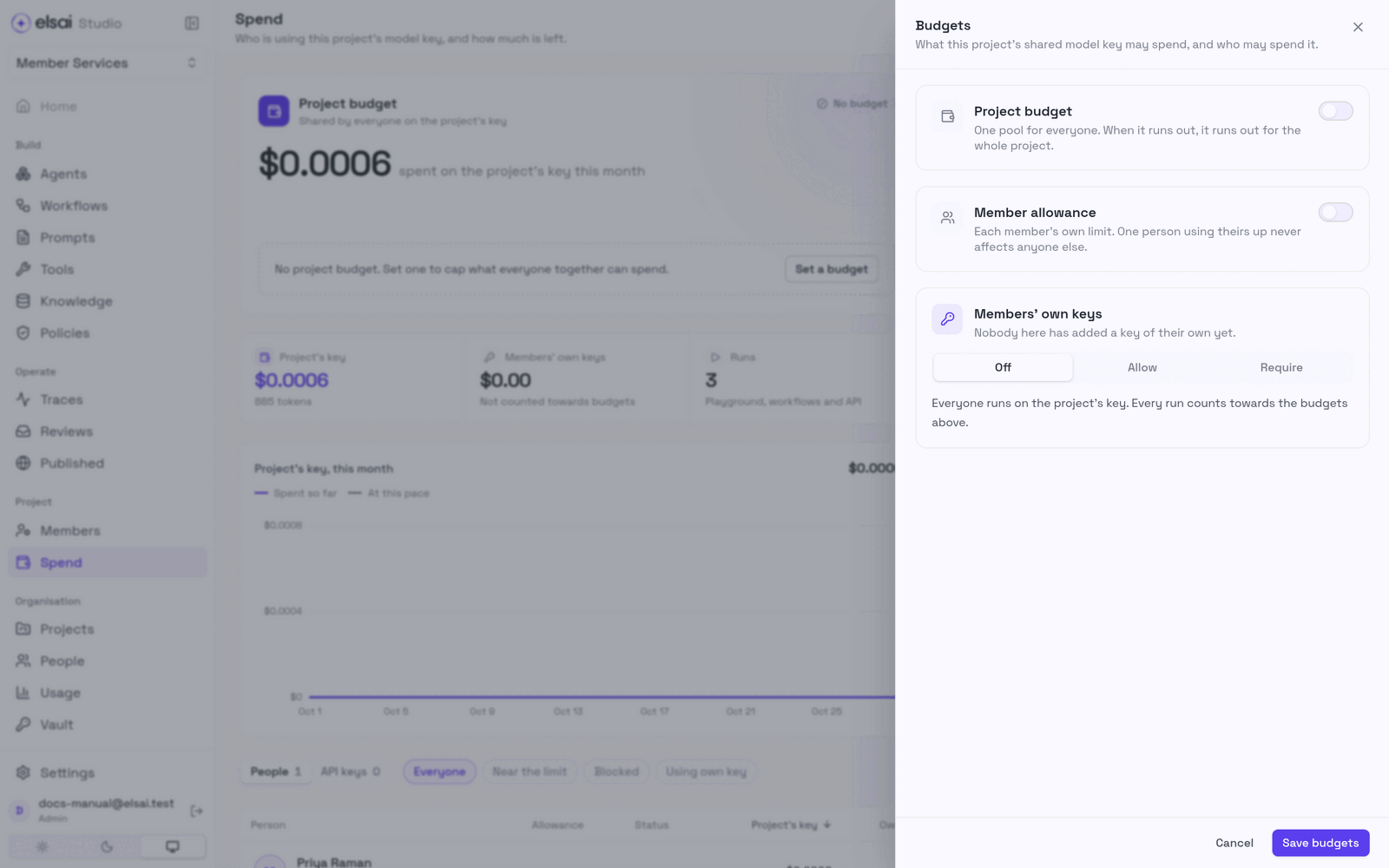
Project budget, switch it on and set Period, Limit by, the dollar and/or token limit, and When it runs out (Block new runs or Warn only). A sentence confirms it, e.g. "Everyone in the project shares $20 a month; new runs stop when it is spent."
Member allowance, switch it on and set the same fields. This is each member's default, e.g. Day, $2. The sentence shows the total: "Each of 10 members can spend up to $2 a day, $20 together a day." If that exceeds the project budget, Studio warns that the pool will run out first; you may still save.
Members' own keys, Off, Allow or Require (§8).
Click Save budgets. Switching a section off and saving removes that budget. Changes apply from the next run.
| Choose | When |
|---|---|
| Dollars | You want a money figure. Needs priced models |
| Tokens | A model has no price, or you want one limit for every model |
| Both | Whichever comes first stops the run |
How the limits combine (monthly; Asha has spent $7)
| Setup | Asha | Ben ($0 spent) |
|---|---|---|
| Project budget $10 only | Can run; $3 left for everyone | Can run, but only $3 left for everyone |
| Allowance $4 only | Blocked at $4 | Can run; his $4 is untouched |
| Project $10 + allowance $4 | Blocked by her allowance | Runs until his $4 or the pool runs out |
| Allowance $4, Asha Custom $8 | Can run ($7 < $8) | Can run ($4) |
5. Give one person a different limit (Admin)
- Spend → People, click the person.
- Under Allowance choose Project default, Custom (their own period, limit and Block/Warn) or Unlimited.
- Click Save allowance.
Keep the Admin who unblocks others on Unlimited while testing, so a limit can never lock out the person who needs to lift it.
6. What people see when a limit bites
| When | Shows |
|---|---|
| Before the limit | A budget chip in the Playground and the workflow run bar, e.g. "$0.29 left today". Amber at 80 % |
| At the limit, Block | "Your allowance used up · resets in …" or "Project budget used up". Runs are refused: "Runs already going finish; an administrator can raise the limit on Spend." |
| At the limit, Warn | Nobody is stopped. "Over … · not blocked", red meters |
By design:
- A run that started under the limit always finishes, so spend can end slightly over.
- The check is at the start of a run, not on each model call.
- Runs launched together cannot jump the limit: Studio reserves room as each starts.
- Dollar limits need priced models.
Unblock someone (Admin)
- Spend → Need attention (or the blocked chip in Rules) filters to Blocked.
- Open the person → Allowance → a higher Custom, Project default or Unlimited → Save allowance.
- If the project budget is the cause, raise it in Budgets.
They can run again at once.
7. See the whole organisation (Admin)
Organisation → Usage shows every project in one table.
Screenshot: Organisation → Usage
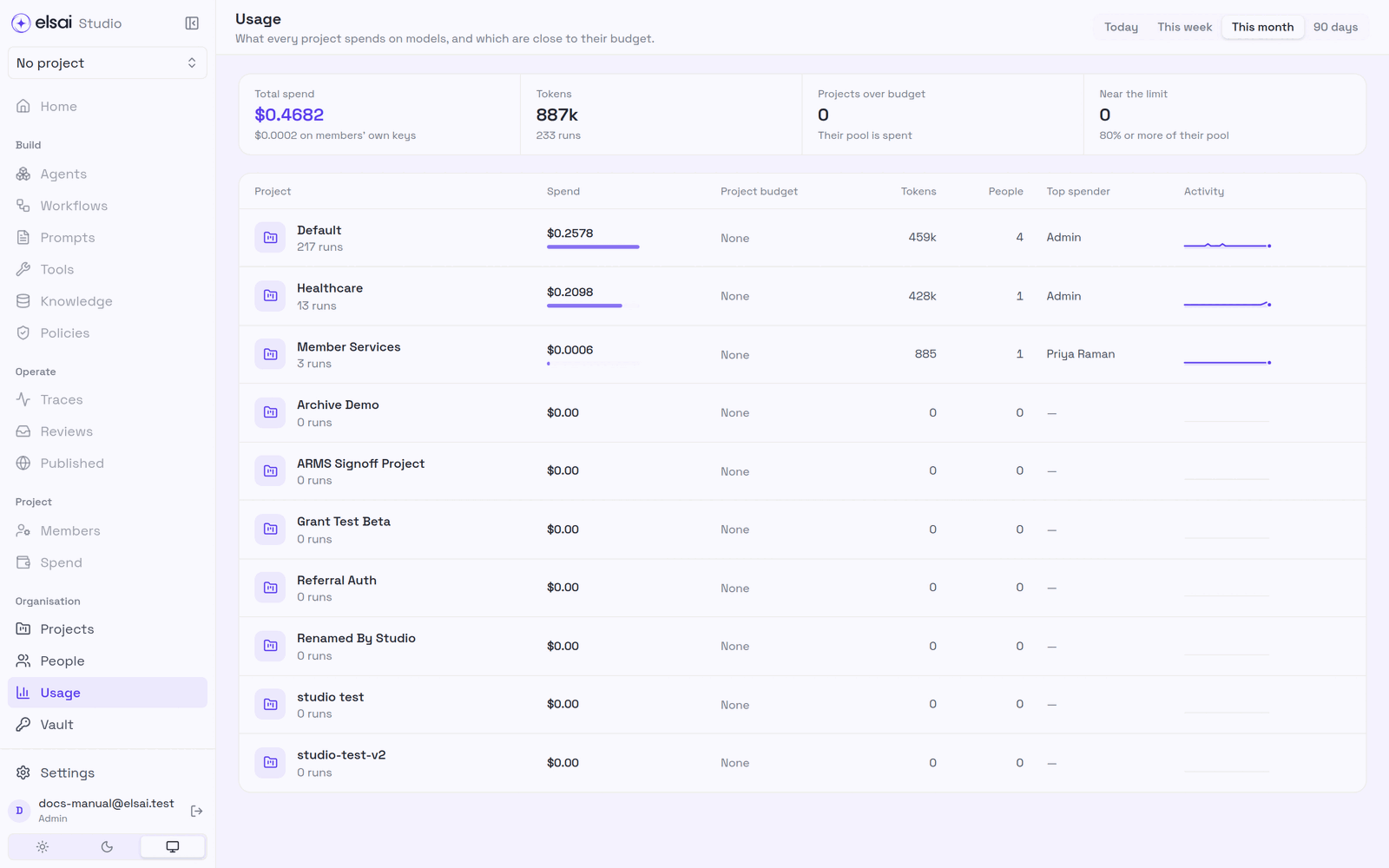
| Shows | Meaning |
|---|---|
| Total spend, Tokens, runs | Across all projects, including members' own keys |
| Projects over budget | Their pool is spent |
| Near the limit | 80 % or more of their pool |
| Per project | Spend, project budget, tokens, people, Top spender, activity |
8. Members' own keys
A member can run on their own model key, sparing the shared budget.
The Admin chooses in Budgets → Members' own keys:
| Setting | Effect |
|---|---|
| Off (default) | Everyone runs on the project's key |
| Allow | A member who has added a key for the model's provider runs on it; it never counts toward a budget |
| Require | Members must bring their own key. API calls still use the project's key |
The member adds a key in Settings → My LLM keys:
- Find the provider: OpenAI, Azure OpenAI, Anthropic, Google Gemini or AWS Bedrock.
- Add key, paste it, Save key. (Bedrock takes
aws_access_key_id,aws_secret_access_keyandaws_regionas JSON.) - The card shows Saved · ends in …1234. Replace or Remove later.
Screenshot: My LLM keys
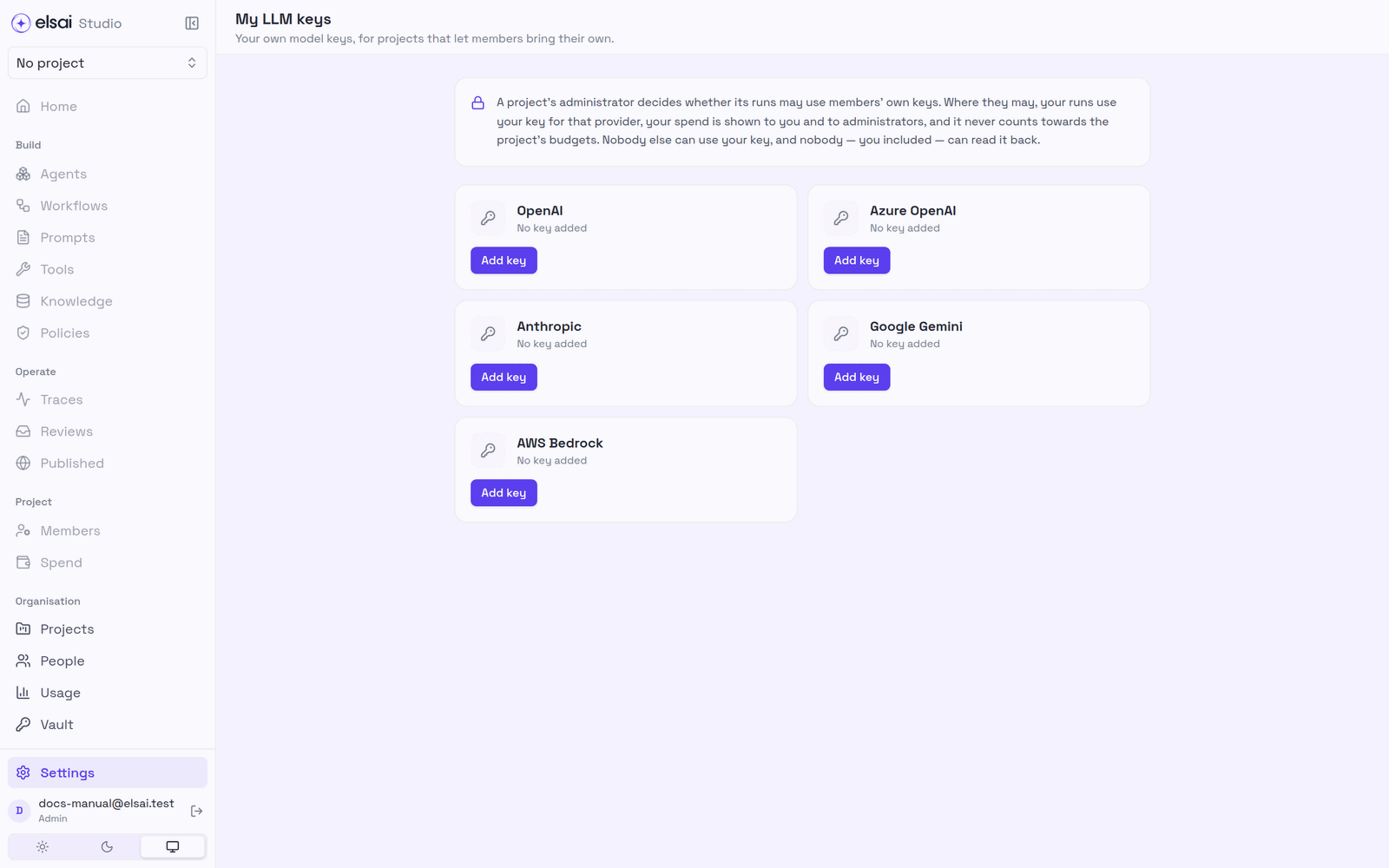
Nobody can read a saved key back, you included. Nobody else can use it. A run counts as own key only if every credential it used was yours.
9. API key budgets
Published agents called from outside are charged to the API key.
- Spend → API keys, click a key → Budget for name.
- Set Period, Limit by and the amount → Save budget. Remove budget clears it.
The project budget still applies on top. A refused call gets HTTP 429 budget_exceeded, with the limit, what was used, when it resets, and a Retry-After header. (Separately, each endpoint has a monthly token budget, see Published agents.)
10. Troubleshooting
| Symptom | Likely cause | Fix |
|---|---|---|
| No Set a budget button | You are not an Admin | Ask an Admin |
| Enter a dollar amount above zero | Blank or 0 | Enter e.g. 2.50 |
| Enter a whole number of tokens | Decimal or text | Whole numbers only |
| Blocked although the pool has money | Your allowance is used up | Admin raises your allowance |
| Blocked although your allowance has room | The project budget is used up | Admin raises it, or wait for the reset |
| Spend went slightly over | The last run started under the limit | Expected |
| A dollar budget never bites | The model has no price | Use a token limit, or price the model |
| Numbers look old | Spend appears when a run completes | Refresh |
| This project runs on your own … key | Policy is Require and you have no key | Add one in Settings → My LLM keys |
| API caller gets 429 | Key, endpoint or project budget used up | Read Retry-After; raise the budget |