
Appearance
What is Workflow Studio?
Workflow Studio is one place to build AI agents, give them tools and knowledge, connect them into workflows, and run those workflows on real cases, with every run recorded and every release approved by a second person.
1. Why it exists
Without Studio, every new use case (prior authorisation, referrals, member support…) means new code for each agent, a new console, and hand-wiring between them. Most of that code is the same each time: asking a person when the AI is unsure, checking the AI's answer is well formed, scoring confidence, applying rules, and recording what happened.
Studio does those things once, for everyone. An agent becomes a form you fill in, not a program you write. A process becomes a map you draw, not code you maintain.
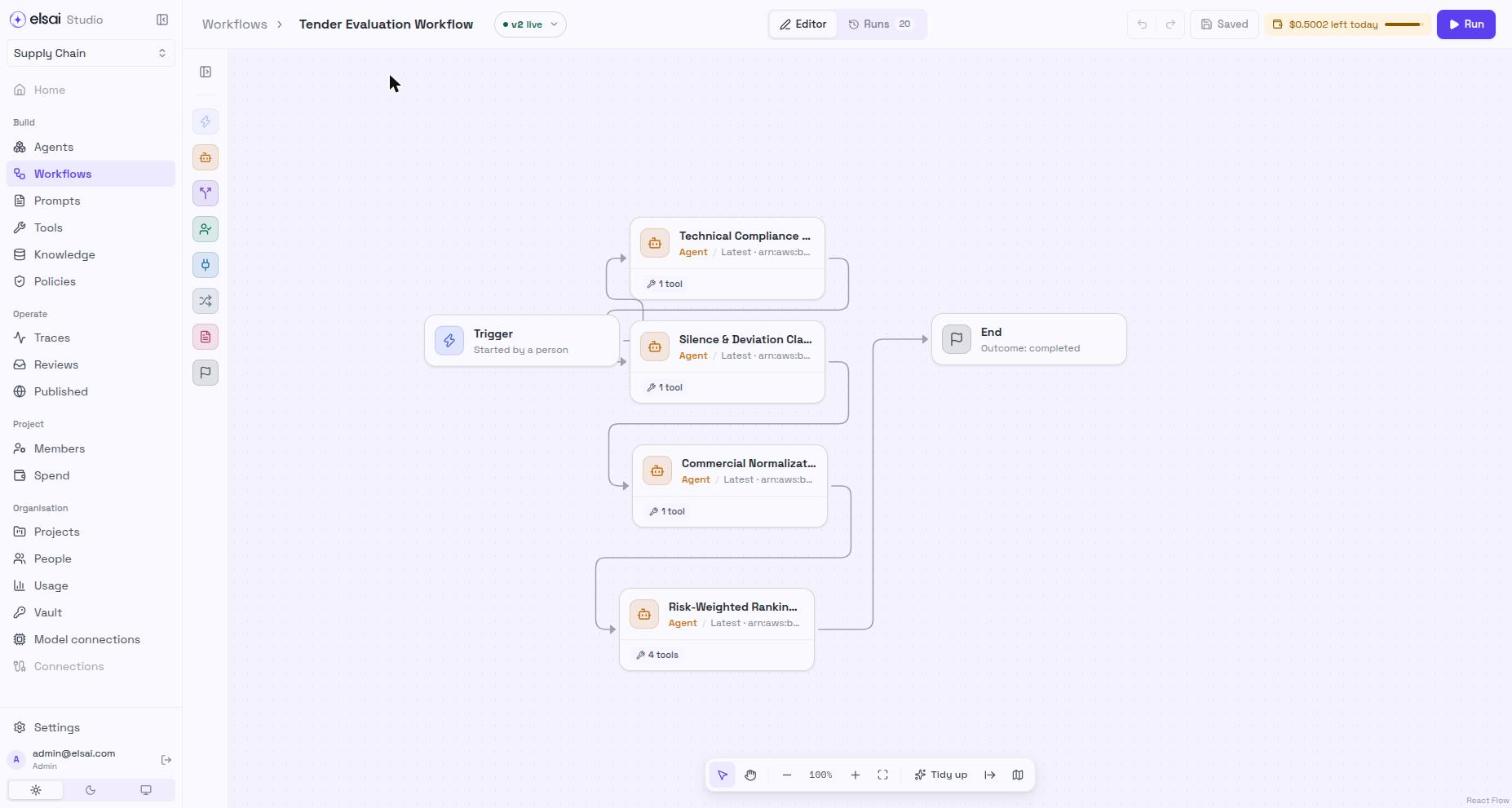
Screenshot: a workflow on the canvas
2. The building blocks
| Block | In one line | Example | Where in Studio |
|---|---|---|---|
| Project | A workspace. Everything below belongs to one project | Member Services | Project picker, top of the sidebar |
| Agent | An AI with instructions, a model, and optionally tools and knowledge | Support Triage reads a request and returns its category and priority | Build → Agents |
| Tool | One ability an agent may use: call a web service, search, calculate | Current Time, a payer lookup | Build → Tools |
| App | A ready-made connection to Gmail, Outlook, Teams and others | Send an email from a connected mailbox | Build → Tools → Apps |
| Knowledge base | Your documents, prepared so an agent can search them | Policy manuals, formularies | Build → Knowledge |
| Skill | Guidance added to an agent's instructions every time | A writing style guide | Build → Knowledge → Skills |
| Prompt | An agent's instructions, versioned and reviewed in Instruction Manager | The triage instructions | Build → Prompts |
| Workflow | A drawn map of steps: agents, decisions, Python, reviews, endings | Support request routing | Build → Workflows |
| Run | One real pass through an agent or workflow for one case | Today's 10:42 request | Run panel, Operate → Traces |
| Review | A run waiting for a person to decide | A low-confidence answer | Operate → Reviews |
One rule to remember: tools and knowledge attach to agents, never directly to a workflow step. A workflow step that runs an agent uses whatever that agent has.
3. The life cycle: build, test, deploy, monitor
Everything you make in Studio (an agent, a tool, a workflow) moves through the same four stages. This is what keeps half-finished work away from real cases.
| Stage | What is true |
|---|---|
| Draft | Saved, editable, not usable by workflows or the API |
| Tested | A run of exactly this version passed (agent) or finished (workflow). Publishing needs this |
| Published | Released. Workflow steps on Latest and API calls use it. It never changes; editing creates a new draft |
| Deprecated | Still works where already pinned, but can no longer be newly chosen |
| Monitored | Every run of a deployed version is traced in ARMS, with its reviews and spend recorded |
Why a second person publishes. By default, the person who wrote a version cannot publish it. An Approver (or Admin) who did not author it must do so. This is the "second pair of eyes" that makes "approved" mean something. (An installation run by one person can switch this off; ask your platform team.)
4. Roles in one table
| Role | Can |
|---|---|
| Viewer | Look at everything in their projects. Cannot change or run anything |
| Author | Build, edit and run. Cannot publish |
| Approver | Everything an Author can, plus publish, deprecate and restore |
| Admin | Everything, plus people, projects, the vault and organisation settings |
Your role says what you may do; project access says where. Full details: People and roles.
5. Studio and the rest of the elsai platform
Studio works with two sibling products. You sign in once, in Studio; your account and access follow you into the others automatically.
| Product | What it does for Studio | You notice it when… |
|---|---|---|
| Instruction Manager (IM) | Stores prompts as versions and puts them through review before they go live | You choose From Instruction Manager in an agent's Behaviour step, or use Build → Prompts |
| Elsai Observe (ARMS) | Records each model and tool call of a run, and holds the price list runs are costed from | You open a run's full trace, or Studio asks you to set a model's price |